
Billing API
- Home
- Billing API
The API to automate your billing
- Uptime 99.99%
- Hundreds of thousands of invoices issued per month
- Technical support and documentation
A billing API used by large companies









"IsToClose" : "true" ,
"SendTo" : "email@email.com",
"Client" : {
"NIF" :"180975030" ,
"Name" :"Company lda" ,
"Address" :"Av. Sidónio Pais, Nº 2, 2 Esq. A" ,
"City" :"Lisbon" ,
"PostCode" :"1050-215" ,
"CountryCode" :"pt" ,
"PhoneNumber" :"99999999" ,
"CountryName" :"Portugal" ,
"LegalName" :"Company lda" ,
"Email" :"email@email.com" ,
"IBAN" :"321654987321654987"
},
"Document" : {
"Type" : "T" ,
"Date" : "????" ,
"DueDate" : ""????" ,
"Description" : "An example api document" ,
"Serie" : "FR" ,
"Currency" : "eur" ,
"EuroRate" : "1" ,
"Retention" : "1" ,
"Lines" : [
{
"Code" : "SI" ,
"Description" : "Product 2" ,
"UnitPrice" : "1" ,
"Quantity" : "1" ,
"Unit" : "unit" ,
"Type" : "S" ,
"TaxValue" : "23" ,
"ProductDiscount" : "20" ,
"CostCenter" : "Cost Center x"
}
]
}
}
Automatically issue an invoice as soon as you make a sale and send it to the customer in a personalized email effortlessly
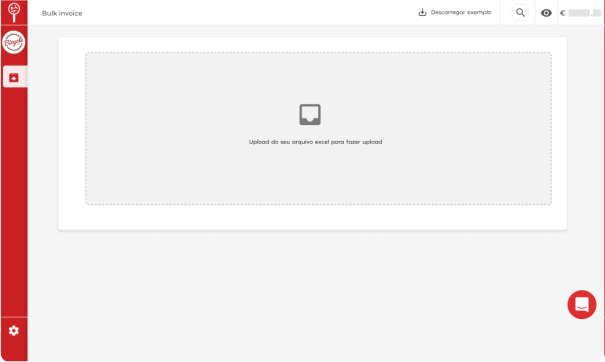
With our Bulk Invoicing you can start invoicing on a large scale without waiting for the API implementation
Subscribe to the Billing API to start automating your company's billing
There are few steps to start implementing the API:
1. Request a quote and 30-day trial.
2.Get your sandbox account to test the API and issue documents without legal validity.
3.Get expert technical support and up-to-date documentation during implementation.
4.Receive production tokens and start earning automatically.
Modern billing API and simple integration, up-to-date documentation and technical support for implementation
When subscribing to the API, in addition to all API documentation and a sandbox account for testing, your company has our specialized technical support team available from 10 am to 7 pm (GMT+1) to assist with any questions regarding implementation.

<inv:Authentication>
<inv:Email> ???? </inv:Email>
<inv:Token> ???? </inv:Token>
</inv:Authentication>
<inv:Client>
<inv:NIF> ???? </inv:NIF>
<inv:LegalName> ???? </inv:LegalName>
<inv:CountryCode> ???? </inv:CountryCode>
</inv:Client>
<inv:Document>
<inv:Date> ???? </inv:Date>
<inv:DueDate> ???? </inv:DueDate>
<inv:Description> ???? </inv:Description>
<inv:Type> ???? </inv:Type>
<inv:Series> ???? </inv:Series>
<inv:TaxExemptionReasonCode> ???? </inv:TaxExemptionReasonCode>
<inv:DocumentReference> ???? </inv:DocumentReference>
<inv:Currency> ???? </inv:Currency>
<inv: Retention> ???? </inv:Retention>
<inv:EuroRate> ???? </inv:EuroRate>
<inv:Lines>
<inv:APIInvoicingProduct>
<inv:Code> ???? </inv:Code>
<inv:Description> ???? </inv:Description>
<inv:UnitPrice> ???? </inv:UnitPrice>
<inv:Quantity> ???? </inv:Quantity>
<inv:Unit> ???? </inv:Unit>
<inv:Type> ???? </inv:Type>
<inv:TaxValue> ???? </inv:TaxValue>
<inv:ProductDiscount> ???? </inv:ProductDiscount>
<inv:CostCenter> ???? </inv:CostCenter>
</inv:APIInvoicingProduct>
</inv:Lines>
</inv:Document>
<inv:IsToClose> ???? </inv:IsToClose>
<inv:SendTo> ???? </inv:SendTo>
</inv:DocumentCreate>
<inv:Authentication>
<inv:Email> ???? </inv:Email>
<inv:Token> ???? </inv:Token>
</inv:Authentication>
<inv:DocumentId> ???? </inv:DocumentId>
</inv:DocumentGet>
<inv:Authentication>
<inv:Email> ???? </inv:Email>
<inv:Token> ???? </inv:Token>
</inv:Authentication>
<inv:Client>
<inv:NIF> ???? </inv:NIF>
<inv:Name> ???? </inv:Name>
<inv:Address> ???? </inv:Address>
<inv:CountryCode> ???? </inv:CountryCode>
</inv:Client>
<inv:Waybill>
<inv:Date> ???? </inv:Date>
<inv:DueDate> ???? </inv:DueDate>
<inv:Description> ???? </inv:Description>
<inv:Type> ???? </inv:Type>
<inv:Series> ???? </inv:Series>
<inv:TaxExemptionReasonCode> ???? </inv:TaxExemptionReasonCode>
<inv:Currency> ???? </inv:Currency>
<inv: Retention> ???? </inv:Retention>
<inv:Lines>
<inv:APIInvoicingProduct>
<inv:Code> ???? </inv:Code>
<inv:Description> ???? </inv:Description>
<inv:UnitPrice> ???? </inv:UnitPrice>
<inv:Quantity> ???? </inv:Quantity>
<inv:Unit> ???? </inv:Unit>
<inv:Type> ???? </inv:Type>
<inv:TaxValue> ???? </inv:TaxValue>
<inv:ProductDiscount> ???? </inv:ProductDiscount>
<inv:CostCenter> ???? </inv:CostCenter>
</inv:APIInvoicingProduct>
</inv:Lines>
<inv:LoadDateTime> ???? /inv:LoadDateTime>
<inv:LoadAddress>
<inv:AddressDetail> ???? </inv:AddressDetail>
<inv:City> ???? </inv:City>
<inv:PostalCode> ???? </inv:PostalCode>
<inv:CountryCode> ???? </inv:CountryCode>
</inv:LoadAddress>
<inv:DestinationAddress>
<inv:AddressDetail> ???? </inv:AddressDetail>
<inv:City> ???? </inv:City>
<inv:PostalCode> ???? </inv:PostalCode>
<inv:CountryCode> ???? </inv:CountryCode>
</inv:DestinationAddress>
<inv:VehicleLicence> ???? </inv:VehicleLicence>
</inv:Waybill>
<inv:IsToClose> ???? </inv:IsToClose>
</inv:WaybillCreate>
Automatically billing via API is very simple
A simple API to implement (Rest and Soap). There are only two methods for your company to start billing automatically:
1.DocumentCreate (POST)
Receives the document parameters such as: Customer name, product, document type, etc. and returns the ID of the generated document.
2.DocumentGet (GET)
Receives an ID and returns the download address of the generated PDF.
3.WaybillCreate (POST)
Used only when you need to create Waybills.
Automatically billing via API is very simple
A simple API to implement (Rest and Soap). There are only two methods for your company to start billing automatically:
1.DocumentCreate (POST)
Receives the document parameters such as: Customer name, product, document type, etc. and returns the ID of the generated document.
2.DocumentGet (GET)
Receives an ID and returns the download address of the generated PDF.
3.WaybillCreate (POST)
Used only when you need to create Waybills.
API for automatic communication of invoices to the AT
You can configure automatic sending to the Tax Authority directly from the API, and view the list of documents successfully communicated. Available methods:
1.ActivationSet Set the company password with the finance portal password.
2.ActivationGet Confirm whether authentication with the finance portal returns success or not.
3.CommunicationList Returns a list of communicated documents with AT communication status for each of the documents.
Document Payment Status Query API
If you need to know whether the document amount is marked as paid or unpaid, you can check this status via the API to automate processes that depend on, for example, the payment of an invoice. Available methods:
1.DocumentGetProperty (GET)
Returns whether the document is paid or unpaid and the outstanding amount.
WooCommerce Billing Plugin
Using the WooCommerce invoicing plugin is an even easier way to automate the invoicing of your WooCommerce online store, as you don’t need to have development skills to automatically invoice every time a sale occurs.
To use it, simply contact our customer support and request an API account to use the plugin in question. You will receive a sandbox account, tokens and all the instructions necessary to use the plugin. Then, simply install the plugin and start invoicing.